Weekend learning programme
Jalna, Maharashtra
The lesson plan, slides and weekly challenge are prepared together using what the class has already covered.
Step details
Read the teaching history
Use earlier sessions and the current syllabus.
Prepare the lesson and activities
Prepare the teaching notes and a suitable student task.
Review the material
The owner checks the lesson before class.
Save slides and the challenge
Keep the deck with the session and add the approved challenge.
Weekly Student Challenges
Add the approved weekly challenge to the leaderboard and save the result.
Prepare lesson slides
Estimated staff time
Before
Prepare the slides, check them and save the link.
With the system
Check the prepared slides, saved with the lesson.
Add the weekly challenge
Estimated staff time
Before
Open the leaderboard, copy the task and check.
With the system
Add the saved task and check the week.
Use lesson notes, selected photos and challenge results to fill the school’s usual newsletter layout.
Step details
Collect the class material
Bring lesson notes and final leaderboard results together.
Choose topics and photos
The owner checks what should be included.
Fill the newsletter layout
Use the existing cover, topic pages and results section.
Review and share the PDF
A staff member shares the checked issue in the parent groups.
Prepare a parent newsletter
Estimated staff time
Before
Write the issue and arrange the material in its layout.
With the system
Check the issue prepared in the school’s layout.
Prepare class reels from filmed footage and educational posts from the school’s topics and parent questions.
Step details
Choose the story
Use real class moments or a topic worth explaining.
Prepare the reel or post
Edit clips and captions, or prepare the image and words.
Check words and visuals
The owner checks the full item together.
Post the approved version
Publish through the connected account or give staff the finished files.
Educational Posts
Prepare posts from teaching topics and parent questions for the owner to review.
Edit a class reel
Estimated staff time
Before
Choose clips, edit, add captions and check.
With the system
Check the suggested clips and draft edit.
Keep each enquiry’s source and next call, then review which activities bring students into the school.
Step details
Save the enquiry and source
Website forms arrive directly; staff add other enquiries.
Set the next follow-up
Keep the earlier conversation with the call reminder.
Record the admission result
Update the same record when the student joins.
Review sources and ad spending
Compare costs with known enquiries and admissions before changing ads.
Enquiry Sources and Admissions
Track enquiry sources through to admission to see which activities bring students.
School Advertising
Prepare school ads and review spending against enquiries and recorded admissions.
Track student payments and eligible referral discounts, then prepare reminders from the current balance.
Step details
Update the student’s fees
Keep instalments and confirmed payments with the student.
Apply eligible referral credit
Carry the referral from the enquiry into the fee record.
Prepare the due reminder
Use the latest balance and due date.
Check and send
Staff confirm the amount and send the parent message.
Prepare ten fee reminders
Estimated staff time
Before
Check balances, write messages and send them.
With the system
Check prepared messages and send them.
Important Email Reminders
Bring important email notices to the owner with the action and deadline.
Changes to Weekly Tasks
Move a task, pause a reminder or change a format by asking.
Work samples
Class notes to parent newsletter
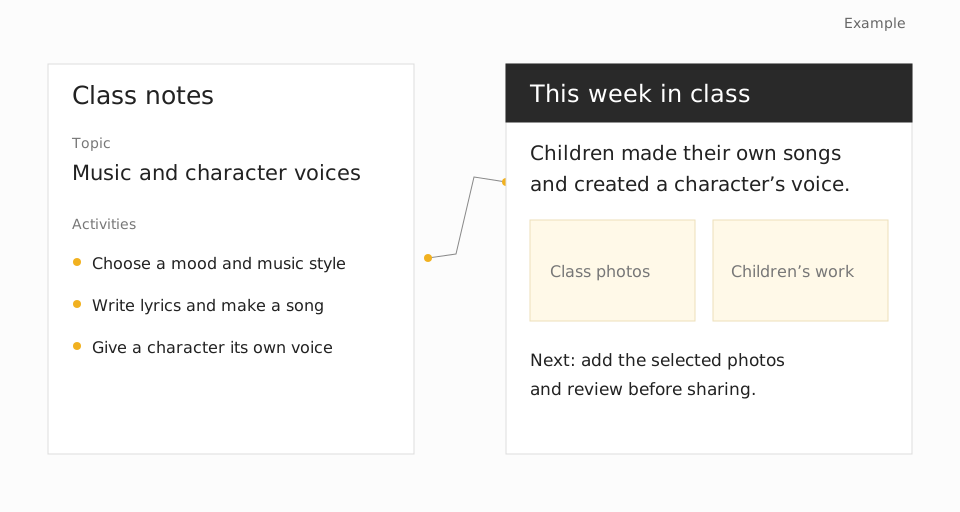
Music and voice lesson slides
Parent conversations, newsletters and fee reminders.
Gamma
Lesson slides made from the checked teaching plan.
Canva
The school’s newsletter and visual formats.
Leaderboard
Weekly challenges, standings and selected winners.
Instagram and Meta ads
School posts and advertising.
Add the week’s results
The newsletter uses current standings and the winner Neeta selected.
Share the checked newsletter
Neeta or the administrator sends the PDF to the existing groups.
Show Jeet how you handle that work today. Start with one real example and the part that takes the most effort.